For businesses whose work is worth showing

Your Instagram,
posted for you.

On the days you choose, built from the photos of your work already on your website. Nothing to upload, nothing to write, nothing to remember.

Shown: the real website and Instagram of Alberino Construction, a customer, used with their permission. They are not part of PostItself.

How it works

Set it up once. Then forget about it.

Three steps, and only one of them needs you — a few minutes, once.

1

Your website is read

Your website already shows your work, so that's where the photos come from. Each post stays on one theme — never a random mix.

2

Your Instagram connects

One link, on your own phone: Instagram asks you to approve it. Your password is never shared, and access can be revoked from Instagram at any time. On a personal account? We'll walk you through the free switch to a business one first.

3

Posts go out on schedule

On the days and at the time you pick. Captions written from your own website's words, hashtags for your line of work and your area.

Who it's for

Any business with work worth showing.

If your website has a gallery of your work, there's an Instagram feed in it. What decides how often to post is how many photos you have.

Not sure? Paste your website and we'll count them.

That's about 17 posts before your photos repeat.

PostingPriceLoops after
1 a week $99/mo17 weeks
2 a week Recommended$179/mo9 weeks
3 a week $239/mo6 weeks

A post usually holds 5 photos and never fewer than 4, and repeat shots and blank close-ups are left out, so a round uses about one post for every 7 photos. When a round ends it starts again with your photos in new combinations, and anything new you add to your website goes in first. Plans go up to 3 posts a week; most businesses don't need more. Not sure how many you have? Paste your website above and we'll count them.

Examples only: made-up businesses, stock photos.

How it keeps going

It doesn't run out of steam.

What happens on every post day, and what happens when the new photos run out.

1

It plans a round of posts

It goes through the work on your website and turns it into posts. Each one sticks to one subject — one job, one service, one piece of work. A page with only a few photos sits out.

2

Everything gets its turn

Posts from the same page of your website are spread out, so followers don't see the same thing twice in a row.

3

Every post is checked first

No near-duplicate shots, no blank close-ups, no post that's the same view over and over. If a check fails, nothing goes up. Each caption is written fresh and compared with recent ones so they don't all sound alike.

4

On your days, at your time

If a post time is missed, it goes out at the next chance — and you never pay for a post that didn't go out. Your Instagram connection renews itself, so you only connect once.

5

No repeats

Once a photo has been posted, it's held back until there are no new ones left. The one exception: a shot that sets the scene, like the outside of a building, can appear again further into a later post — never as its cover.

Then it goes round again

When the new photos run out, it plans a fresh round by itself instead of stopping. Add new work to your website and it's picked up automatically, no need to tell us.

Your numbers

See exactly what it's doing.

No report to wait for. Instagram keeps the numbers itself, updated live, and they're three taps away on your own phone.

1. Tap your profile picture, bottom right

2. Tap Professional dashboard

3. Views, interactions and profile visits for the last 30 days

Any single post: open it and tap View insights

The number that matters isn't followers — it's profile visits and link taps. Someone tapping through to your website is a person deciding whether to call you.

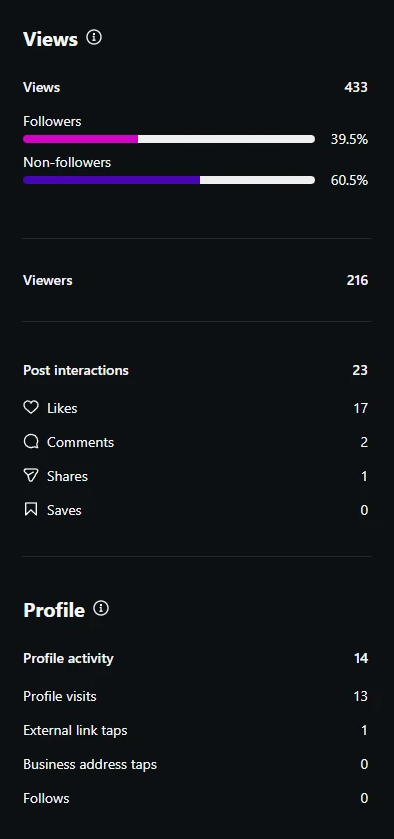
Instagram insights for one post: 433 views from 216 accounts,
                17 likes, 2 comments, 1 share, 13 profile visits and 1 website tap.
Real numbers from one post, straight from Instagram: Alberino Construction, Sept 24.

Pricing

Simple, monthly, cancel whenever.

No contract, no notice period, no setup you have to sit through.

Your first month is free, and you don't need a card to start. It begins the day your first post goes out. Near the end we'll send you a link to keep going — and if you'd rather not, ignore it. We stop, and you owe nothing.
Posts per weekPer post Per month
1$23$99
2 $21$179
3$18$239

No setup fee. By card it's the monthly price above, and a post that doesn't go out is refunded. By invoice you pay for each post that actually went out — a missed week is a smaller bill, not an argument. No Instagram account yet? We'll set one up for you with your own email, and you change the password right after — free for now.

What the same job usually costs

Posts made for you, about 8–13 a monthPer month
Contractor social media services and small agencies Footbridge Media $199–249, WolfPack Advising from $629, LYFE Marketing $750, on Facebook or Facebook + Instagram. Their own posted prices, checked Oct 12, 2026; sources below. $199–750
PostItself, 2 posts a week You do nothing About 9 carousels a month on Instagram, made from your own project photos, captions written for you. $179

Cheaper options exist, and they're all in the table below: services from $99 for 10–12 posts a month, made from photos you send or stock images, and AI tools you set up yourself.

Every option we found

OptionPer month
Scheduling apps you run yourself You still take, pick and write every post. Free–$99
AI tools that write and post for you Monthly price. You connect it and usually review posts or upload photos; images are often stock or AI-made. $39–79
Budget posting services 10–15 posts a month made by a person, from photos you send, stock images or graphics. $99–149
PostItself, 2 posts a week About 9 a month on Instagram, from your own project photos. $179
Social media services for contractors Made by their team, about 8–13 posts a month, on Facebook and often Instagram. $199–629
A social media manager or agency About 8–12 posts on 1–2 platforms, plus replying to comments and simple reports. $500–2,000

The pricier options usually do more, like replying to comments, stories or video. PostItself does one thing: it keeps your Instagram showing your real work, without you lifting a finger. Coming soon: comment replies. Replies are written for you and checked by a person before they go out, and anyone asking for a quote is passed straight to you. Until then, comments stay with you.

Where these numbers come from

  1. Scheduling apps, Free–$99. Buffer: free plan, 3 channels and 10 scheduled posts per channel (its page says prices were last updated November 2025). Hootsuite: paid plans start at $99 per user a month. Checked Oct 12, 2026.
  2. AI tools, $39–79. Marky: $39 or $79 a month billed monthly ($19 or $39 billed yearly). Apaya: $69 a month ($55 billed yearly), learns from your website and posts on autopilot to 4 accounts. Checked Oct 12, 2026.
  3. Budget posting services, $99–149. $99 Social: $99 for 10 posts or $149 for 15 on one channel (+$10 per extra channel); your photos if you send them, otherwise stock; comment and DM replies stay with you. Socinova: $99 for 12 image posts on Facebook + Instagram. Feedbird: from $99 for 10 posts. Checked Oct 12, 2026.
  4. Contractor services, $199–629. Footbridge Media: $199 for Facebook only or $249 for Facebook + Instagram, 3 posts a week made by their team, $49 first month, no contract. Members of its paid Contractor Marketing Program can add it for $99. WolfPack Advising: from $629, Facebook + Instagram, 8 feed posts and 4 stories a month, written and designed by their team. Checked Oct 12, 2026.
  5. Managers and agencies, $500–2,000. eClincher's 2026 pricing guide (Jan 6, 2026; written by a software company, no survey cited): $500–2,000 a month for about 8–12 posts on 1–2 platforms with light engagement and simple reports. LYFE Marketing: $750 a month for 12 image posts on Facebook + Instagram, including replies to comments, plus a one-time $300 setup fee. Checked Oct 12, 2026.
Send your website. Get a straight answer.

We'll look at your website and tell you honestly whether it's a fit. If it is, your first month is free, and you don't need a card to start.

Prefer to talk? Call or text (330) 242-6172